

Follow every product and every stock movement.
Manage products, supplier codes, measured quantities, packs and optional manufacturing. Track eligible units by serial number, set product-specific low-stock alerts, export customer price lists and follow every purchase, adjustment, transfer and sale.

7 connected areas, together on one page.
Jump to a section or scroll through the workflows and product details. Desktop images use fictional demo data.
Products
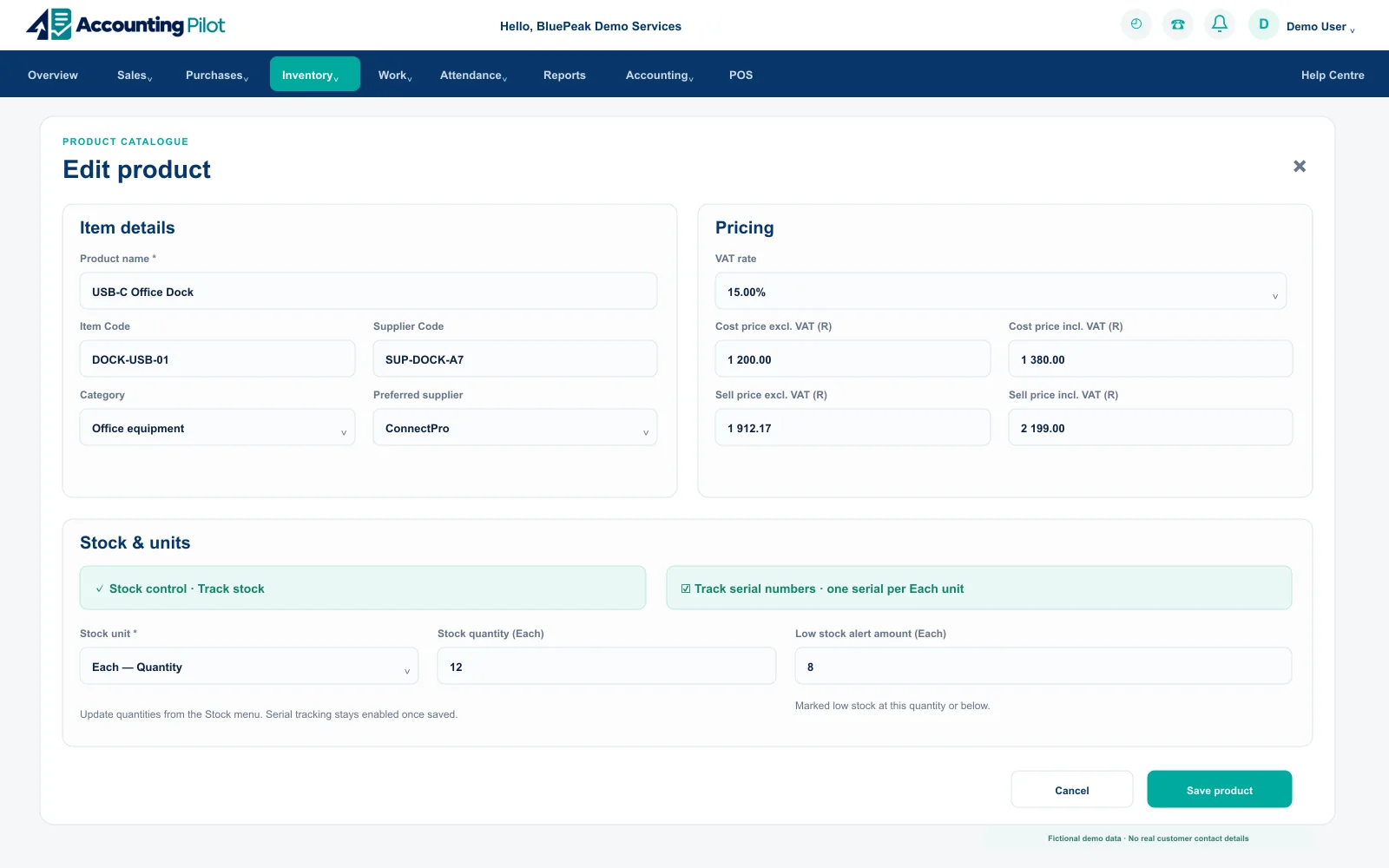
Organise your own item codes, supplier-specific item codes, barcodes, descriptions, VAT-aware costs, up to five customer price levels, suppliers, units, packs, optional manufactured-product recipes, product images and stock settings for reuse across sales, purchases and Point of Sale.
The commercial detail behind every line item
Products provide one source of truth for documents, purchases, stock and margin reporting.
What your team can do
- Search by name, item code, supplier code, barcode, category, supplier or description.
- Store VAT-aware cost, price, profit, margin and low-stock rules.
- Sell as individual items, measured quantities or whole boxes, packets, crates, bags, cases, packs, trays, cartons or bundles.
- Define pack contents as Each, kg or inner Packs so sales documents can show pack quantity, total contents and U/M.
- Review CSV matches before adding or updating products; existing stock quantities, movements, pack settings and sales history stay unchanged.
- Name and enable customer price levels 2–5 only when needed; Level 1 remains the default.
- Enable manufactured products only if you build finished items from inventory components; review available build quantities, linked stock and build history.
- Set a low-stock alert amount per product; use zero for out-of-stock alerts only.
- Enable serial tracking for eligible Each products and retain the unit history through purchases, adjustments, invoices and returns.
Reusable catalogue
Search or create products while preparing documents and purchases, while keeping your item code separate from the supplier’s code.
Pricing clarity
Keep costs, selling prices, profit and margin together.
Measured inventory
Use Each, kg, g, mg, L, mL, m, cm, mm or a defined whole pack with suitable decimal precision.
Optional manufacturing
When enabled in Stock setup, define a finished product from saved components; builds and made-to-order sales use linked stock, deduct components and retain calculated cost and history.
Product-specific alerts
Set the low-stock alert amount for each product rather than using one threshold for every item.
Serial and weight setup
Enable serial tracking for eligible stock-controlled Each products, or sell eligible kilogram and gram products by measured weight in POS.
Set up the product
Record your item code, supplier item code, barcode, category, supplier, unit, prices and stock control.
Use it everywhere
Select the saved product in quotes, invoices, orders and purchases.
Review performance
Connect product activity with stock and supplier reporting.
Stock
Control individual items, measured stock and whole packs across up to five locations, see low and zero stock and connect every movement to purchases, adjustments, transfers and sales.
One current stock position with the movement behind it
Use a combined total or open the location detail when the business needs more precise control.
What your team can do
- Configure up to five named locations or use one combined total.
- Track Each, kg, g, mg, L, mL, m, cm and mm with appropriate precision.
- Keep whole pack quantities and their total Each, kg or inner-pack contents visible on connected documents.
- Build an enabled manufactured product from saved components: component stock decreases and finished stock increases with a calculated cost.
- Review low stock, zero stock, cost value and movement by supplier.
- Open the Products Activity Report for dated product movements, customer, supplier and location filters, stock statements and branch transfers.
Location visibility
Use one total or enable up to five named stock locations.
Reorder attention
See low-stock and out-of-stock products against each product’s saved threshold, with the company default available for other items.
Pack-aware control
Track boxes, packets, crates, bags, cases, packs, trays, cartons and bundles without losing the contents quantity.
Movement context
Connect current levels to purchases, adjustments, transfers, stock takes and invoiced sales.
Configure control
Choose combined or multi-location stock and enable the locations in use.
Receive and move
Update quantities through purchases, adjustments and transfers.
Review and report
Filter current levels and open the movement behind a result.
Serial No. Tracking
Track one serial number per eligible Each unit through purchases, stock adjustments, transfers, cloud invoices and returns. Search the serial register to see availability, location, linked customer invoice and movement history.
A clear history for every individual unit
Optional serial tracking connects the physical item to its stock and document trail. The saved history remains protected when the company turns off tracking for new products.
What your team can do
- Review Available, Sold, Removed and Returned to supplier statuses.
- Inspect stock location, current invoice or customer, and last update in the serial register.
- Track opening stock, receipts, removals, transfers, invoice activity and customer or supplier returns.
- Serial-tracked products use cloud invoices; current desktop POS releases do not collect serial numbers.

Traceable stock
Capture serials when stock is received and retain them through adjustments, transfers and returns.
Customer connection
Select available serials on a cloud invoice and identify the original units when a customer returns them.
Search and investigate
Filter by product or status and open a serial’s history from the register.
Enable tracking
Enable serial number tracking in Inventory setup, then turn it on for an eligible stock-controlled Each product.
Record the units
Receive or adjust stock with one serial per unit, then select the serials on the cloud invoice.
Follow the history
Search the serial number, item code or product and inspect its status, location and transaction trail.
Price List
Choose an enabled named price level or a customer’s assigned level, search products, filter a category and export a current selling-price list to CSV or Print/PDF.
The right prices without rebuilding a spreadsheet
Price lists reuse saved product prices, units and pack sizes, with separate VAT-exclusive and VAT-inclusive columns when your business is VAT registered.
What your team can do
- Choose a named price level or a customer and their assigned level.
- Include item code, name, category, unit, optional barcode and pack size.
- Show separate VAT-exclusive and VAT-inclusive prices for VAT-registered businesses.
- Prices are per unit before invoice discounts and delivery; the default price applies where no separate level price is saved.

Customer-specific pricing
Choose a customer to use their assigned price level, or select an enabled price level directly.
Focused catalogue
Filter active products by category and search name, code or barcode before exporting.
Useful output
Download CSV or prepare a landscape PDF ready to print or send to the customer.
Choose the prices
Select the customer or enabled price level and review the current per-unit prices.
Focus the list
Search or filter the category and check units, packs and VAT columns.
Share the result
Export CSV or Print/PDF with the date and selected price level.
Stock Adjustment
Add, remove or correct measured quantities, run a live stock take and retain adjustment history with user, date, reason and location context.
A controlled answer when physical stock changes
Adjustment and stock-take tools keep the current quantity useful without deleting how it changed.
What your team can do
- Run a live stock take including products currently at zero.
- Filter stock-take rows by supplier and skip blank entries.
- Review complete stock-adjustment history by product and location.
- Capture the serial numbers being received or removed for eligible serial-tracked products.

Live stock take
Count current products, include zero-stock items and skip blank rows safely.
Supplier filtering
Narrow the count or correction list by supplier and product detail.
Full history
Review who adjusted stock, when, where, why and by how much.
Choose the mode
Start a stock take or select a specific product adjustment.
Count or correct
Enter the measured quantity, location and reason.
Review the history
Confirm the resulting level and keep the audit record.
Stock Transfers
Transfer units or measured quantities from one location to another and review the completed transfer history for every affected product.
Location movement with built-in accountability
Each transfer keeps its source, destination, quantity, user and date connected to the current stock position.
What your team can do
- Transfer stock between enabled business locations.
- Protect against moving more than the available quantity.
- Review stock-transfer history with source, destination and quantity.
- Retain the selected serial numbers when eligible tracked units move between locations.

Enabled locations
Move stock only between locations configured for the company.
Measured quantities
Retain suitable precision for units, kilograms, litres and metres.
Transfer history
Review previous source-to-destination movements when investigating stock.
Select the product
Choose the stock-controlled product and current source location.
Move the quantity
Confirm the destination and measured quantity available to transfer.
Check the history
Review both location balances and the saved transfer record.
Stock Reports & Reordering
Open Stock Balances, adjustment and transfer reports, reordering, Products Activity, Serial No. Tracking and customer-specific price lists, then inspect the detail or prepare your next supplier order.
Current quantities with a practical next step
Stock reports separate on-hand balances, adjustments, transfers and reorder decisions while keeping every result connected to products, locations and suppliers.
What your team can do
- Review Stock Balances (SOH), adjustment history, transfer history and reordering.
- Use fast product search to open a dated activity statement with sales, purchases, adjustments and branch transfers.
- See on-hand quantity, low-stock level, last cost and last date of purchase.
- Create a prefilled purchase order from one or more selected products.
- Open Serial No. Tracking and price-list tools directly from the Inventory workspace.

Balance visibility
Review stock on hand by product, location and supplier.
Audit reporting
Filter dated product activity by customer, supplier, location, product and movement type, with individual stock balances and branch transfers.
Faster reordering
Select low-stock products, enter order quantities and open a prefilled purchase order.
Flexible sharing
Export the Products Activity Report to Excel or PDF, or share the supported report through WhatsApp.
Unit-level history
Search the Serial No. Tracking register for a product, serial number or item code and inspect its movement history.
Customer-ready prices
Build a price list from a named price level or customer, filter by category and export CSV or Print/PDF.
Choose the report
Open balances, adjustments, transfers or the reorder workspace.
Filter and inspect
Use date, location, supplier and stock-status controls to focus the result.
Export or order
Export or print the report, or turn selected reorder lines into a purchase order.
Explore inventory with your own business records.
Invite one teammate and try the connected workflow with no payment card required.